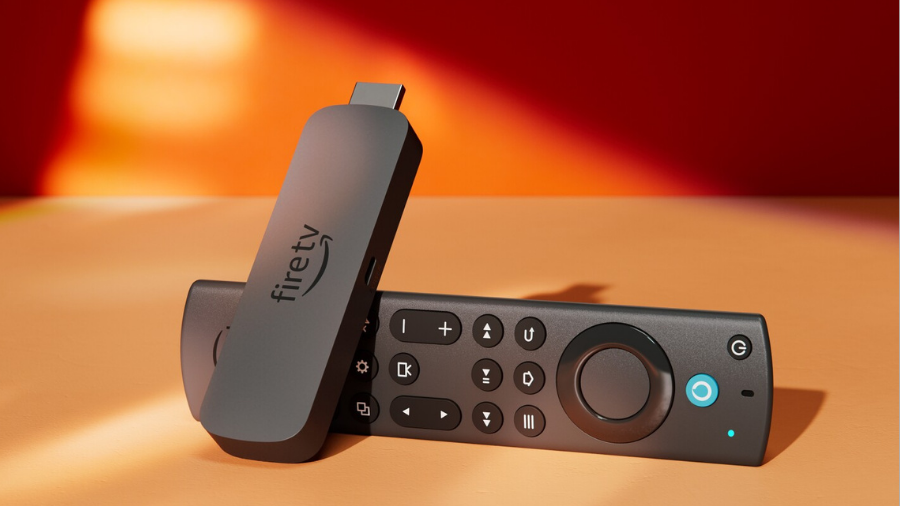
The streaming wars have made one thing clear – you need reliable hardware to enjoy your favorite content. With Amazon slashing prices on their Fire TV Stick 4K by a whopping 40%, bringing it down to just $29.99 from its regular $49.99 price tag, I couldn’t help but wonder if this affordable streaming device delivers genuine value or if it’s just another budget disappointment.
After extensive testing, I’ve found that this little HDMI dongle packs quite a punch for its size and price point. The question isn’t whether it works – it certainly does – but rather if it’s the right streaming solution for your specific needs, especially when compared to its more powerful sibling, the Fire TV Stick 4K Max.
What’s in the Box & Setup Process
Complete Package Contents
The Amazon Fire TV Stick 4K comes with everything needed to start streaming immediately. The package includes the Fire TV Stick 4K device itself, the Alexa Voice Remote, a power adapter, an HDMI extender, two AAA batteries for the remote, and quick start documentation. The HDMI extender is particularly useful for TVs with limited space behind them or when HDMI ports are difficult to access.
Setup Process Simplified
Setting up the Fire TV Stick 4K is straightforward and can be completed in under 10 minutes. First, insert the batteries into the Alexa Voice Remote. Connect the Fire TV Stick to your TV’s HDMI port, then plug the power adapter into an electrical outlet. Once powered on, the device guides you through the remaining setup process, including connecting to your Wi-Fi network and signing into your Amazon account.

Software Updates
Upon first boot, the device typically requires an initial software update. This update ensures you have the latest features and security patches. Depending on your internet speed, this process usually takes 2-5 minutes to complete. The system handles these updates automatically, requiring minimal user intervention.
Optimal Placement Tips
For the best streaming experience, position the Fire TV Stick where it has clear access to your Wi-Fi signal. If you encounter interference or weak signal issues, use the included HDMI extender to move the stick away from the TV’s metal housing, which can block wireless signals. This small adjustment often significantly improves connectivity and streaming performance.
Account Requirements
An Amazon account is mandatory to use the Fire TV Stick 4K, though a Prime subscription is optional. During setup, you’ll have the opportunity to sign into various streaming services you already subscribe to, such as Netflix, Disney+, or Hulu. The device remembers these credentials for convenient access across apps.
Hardware Specifications & Performance
Processor Capabilities
The Fire TV Stick 4K features a quad-core MediaTek MT8696D processor running at approximately 1.7 GHz. This processor efficiently handles 4K streaming content with minimal buffering under normal network conditions. The chipset performs well with standard streaming tasks, navigating menus, and running most applications, though you may notice slight lag when switching between resource-intensive apps.
Graphics Performance
The GE9215 GPU (running at around 650 MHz) delivers reliable performance when displaying 4K HDR content. During testing, it renders vibrant colors and sharp details in compatible content. The graphics processor handles the demands of HDR processing well, though complex animated menus or graphics-intensive games might occasionally cause minor frame drops.
Memory Constraints
With 2GB of RAM, the Fire TV Stick 4K provides adequate multitasking capabilities for a streaming device. However, the 8GB internal storage represents a significant limitation. After system files, users typically have about 5GB available for apps and updates. This necessitates regular management of installed applications, especially considering that popular streaming apps can each consume 500MB-1GB with updates and cached content.
Wi-Fi 6 Advantages
The inclusion of Wi-Fi 6 (dual-band 2.4GHz and 5GHz) provides tangible benefits, particularly in homes with numerous connected devices. This newer standard offers improved traffic management, resulting in more stable streaming even when multiple devices compete for bandwidth. Users with compatible Wi-Fi 6 routers will notice fewer buffering interruptions during peak usage times.
Bluetooth Connectivity
Bluetooth 5.2 with BLE (Bluetooth Low Energy) support allows for easy connection of wireless headphones, game controllers, keyboards, and other accessories. The connection remains stable within typical room distances, and the low energy implementation helps preserve battery life in connected peripherals.
Thermal Management
During extended streaming sessions, the Fire TV Stick 4K warms up noticeably but rarely becomes hot enough to cause concern. The plastic casing acts as a passive heat dissipator, though in poorly ventilated entertainment centers, performance throttling might occur after several hours of continuous 4K streaming.
Video & Audio Quality Assessment
4K Ultra HD Capabilities
The Fire TV Stick 4K delivers on its promise of crisp 4K Ultra HD output at up to 60 frames per second when connected to compatible displays. The difference is most noticeable on large screens (55″ and above), where the increased pixel density creates sharper images with more defined details in landscapes, textures, and text elements.
HDR Format Support
Support for multiple HDR formats represents one of this device’s strongest features. Content encoded in Dolby Vision shows excellent dynamic range with deeper blacks and more vibrant highlights. HDR10+ and standard HDR10 content also display well, with HLG (Hybrid Log-Gamma) support ensuring compatibility with broadcast HDR content. Each format delivers noticeably improved contrast and color accuracy compared to standard dynamic range content.
Visual Improvements
When streaming compatible content, the visual improvements are substantial. Darker scenes reveal more detail in shadows without losing definition, while bright scenes maintain highlight details that would be lost in non-HDR playback. Color gradients appear smoother, and the overall image presents more depth and dimensionality, particularly in nature documentaries and cinematic content.
Audio Performance
Dolby Atmos support creates an immersive audio experience when connected to compatible sound systems. The spatial audio positioning accurately places sounds within a three-dimensional space. Even through standard TV speakers, Dolby Digital Plus provides clear dialogue and reasonable separation between audio elements. The device correctly passes through audio signals to external receivers without compression artifacts.
Headphone Experience
When paired with Bluetooth headphones, the audio quality remains impressive. Stereo separation is clear, and dialogue remains intelligible even during action sequences. There is occasionally a slight audio delay when using wireless headphones, though this varies by headphone model and can usually be corrected in settings.
Troubleshooting Common Issues
Occasional video stuttering during 4K playback typically stems from network limitations rather than device capabilities. Ensuring your internet connection provides at least 25Mbps consistently resolves most streaming issues. For audio problems, checking that your TV’s HDMI port supports the required audio formats (particularly for Dolby Atmos passthrough) often resolves output issues.
The Verdict: Should You Buy It in 2025?
After weeks of testing the Amazon Fire TV Stick 4K across various TVs and network conditions, I’m confident in recommending it as an excellent value streaming device for most users. At its current $29.99 price point, it delivers impressive 4K HDR performance and a responsive interface that handles most streaming tasks with ease.
The 8GB storage limitation is its biggest drawback, especially if you install many apps, but this can be managed with some basic housekeeping. Unless you specifically need the ambient display features or slightly faster performance of the Max version, this standard 4K model hits the sweet spot of price and performance.
For new smart TV buyers, cord-cutters, or anyone looking to upgrade an aging streaming device without breaking the bank, the Fire TV Stick 4K represents one of the best values in streaming technology today.