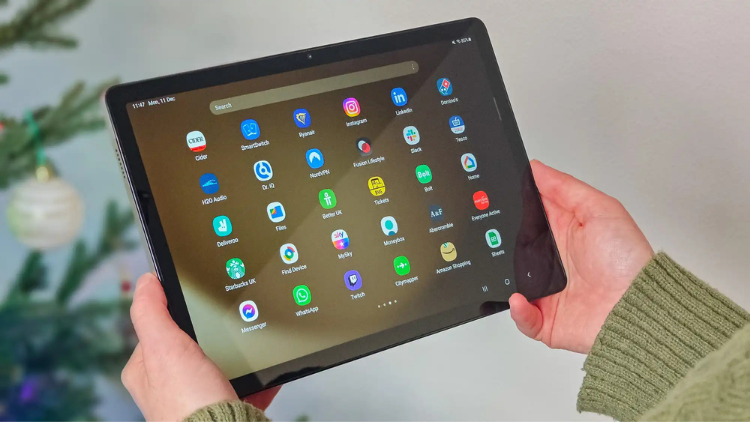
The tablet market has become increasingly competitive, with options spanning every price point imaginable. Among these contenders, the Samsung Galaxy Tab A9+ stands out as a particularly interesting proposition. I recently spent time with this 11-inch, 64GB model, and what struck me most wasn’t just its metal body or 90Hz display, but how it balances premium features with accessibility.
According to recent sales data, mid-range tablets like the A9+ now account for over 40% of the tablet market – proving that consumers want quality without flagship prices. Whether you’re considering this device at its regular $219.99 price tag or hunting for that sweet $149 promotional deal, this comprehensive breakdown will help you determine if the Tab A9+ deserves a place in your tech collection.
Design and Build Quality
The Galaxy Tab A9+ makes a strong first impression with its sleek metal unibody construction. Measuring just 10.12″ × 6.64″ × 0.27″, this tablet strikes an excellent balance between screen real estate and portability. The aluminum chassis provides a premium tactile experience that genuinely surprises considering its mid-range classification.
Weight distribution deserves special mention—Samsung has engineered the tablet to balance comfortably during extended usage sessions. Whether you’re streaming content or reading documents, the ergonomics minimize hand fatigue, a crucial consideration for a device designed for entertainment and productivity.

Color options remain tastefully understated, with neutral tones that maintain professional aesthetics while fitting seamlessly into any environment. The build quality demonstrates remarkable durability for daily transport between home, work, or school environments. Though not explicitly ruggedized, the solid construction should withstand the typical bumps and minor drops of everyday use.
Display Performance
The 11-inch TFT LCD panel represents one of the Tab A9+’s strongest features. With a WUXGA resolution (1920 × 1200), text appears crisp and images render with sufficient detail for most content consumption needs. The panel delivers respectable visual fidelity that competes effectively with other tablets in this segment.
The 90Hz refresh rate elevates the user experience beyond what many competitors offer at this price point. This higher-than-standard refresh rate translates to noticeably smoother scrolling through websites, social media feeds, and documents. Animation transitions in apps and games appear more fluid, creating a more responsive feel throughout the interface.
Brightness levels perform adequately for indoor environments, though direct sunlight remains challenging—a common limitation in this price category. Color reproduction offers good vibrancy for media consumption, though it lacks the color accuracy of higher-end AMOLED displays found in Samsung’s premium tablet lineup. When compared to similarly priced alternatives, the display performs admirably, particularly when the 90Hz refresh rate is factored into the equation.
Hardware and Performance
At the core of the Galaxy Tab A9+ sits Qualcomm’s Snapdragon 695 processor built on a 6nm manufacturing process. This mid-range chipset handles everyday tasks with reasonable efficiency—web browsing, document editing, and media streaming run without noticeable hesitation. The processor demonstrates its capabilities particularly well when handling multiple lightweight applications.
The 4GB RAM configuration represents perhaps the most significant constraint for power users. While sufficient for standard tasks and moderate multitasking, memory-intensive applications can occasionally trigger reloads when switching between numerous apps. For typical users focusing on content consumption with occasional productivity, this limitation rarely becomes problematic.
Storage considerations are more favorable with 64GB internal capacity supplemented by microSD expandability up to 1TB. This combination provides flexibility for media libraries, document storage, and app installations without requiring immediate cloud reliance.
Gaming capabilities remain modest but serviceable. Casual titles run smoothly, while more graphically intensive games require reduced settings to maintain acceptable frame rates. Thermal management performs efficiently during extended sessions, with the metal body effectively dissipating heat without uncomfortable hot spots.
Battery Life and Charging
The 7,040mAh battery capacity translates to impressive endurance for a tablet of this size and performance class. Under typical mixed-use scenarios, the Galaxy Tab A9+ delivers approximately 8-10 hours of active screen time—sufficient for a full day of intermittent usage or extended media consumption sessions.
Battery performance varies predictably based on usage patterns. Video streaming at moderate brightness levels yields approximately 10-12 hours, while more intensive tasks like gaming or video conferencing reduce runtime to around 6-7 hours. Standby efficiency is particularly noteworthy, with minimal battery drain during idle periods thanks to effective power management optimizations in Android 13.
Charging speeds meet industry standards rather than exceeding them, with the tablet requiring approximately 3-4 hours for a complete charge from empty. Samsung includes a standard charging brick rather than an accelerated charging solution. For long-term battery health, the tablet incorporates intelligent charging management to reduce degradation over its operational lifespan.
Audio and Media Experience
The quad-speaker array with Dolby Atmos support delivers unexpectedly robust audio performance for a tablet in this category. Sound reproduction exhibits good stereo separation with respectable dynamic range, creating an immersive experience for content consumption without requiring external speakers.
Audio profiles adapt well to different content types. Movie dialogue remains clear and centered, music playback delivers reasonable bass response given the form factor constraints, and gaming audio provides directional clarity. Maximum volume levels prove sufficient for personal listening in moderately noisy environments.
Bluetooth audio performance maintains stable connections with wireless headphones and speakers, with support for current codecs ensuring quality wireless sound transmission. The absence of a 3.5mm headphone jack reflects industry trends but may disappoint some users with legacy audio accessories.
Popular streaming applications perform smoothly on the hardware, with the display and audio components combining to create a satisfying media consumption package. Audio recording via the integrated microphones delivers clear voice capture for video conferencing and voice notes.
Camera System
The 8MP rear camera delivers functional photography capabilities within the inherent limitations of tablet photography. Image quality is serviceable in good lighting conditions, producing photos suitable for reference documentation, scanning, and augmented reality applications. Low-light performance is predictably modest, reinforcing that this camera system serves utility rather than creative photography.
The 5MP front-facing camera proves more practically valuable, offering clear video call quality for remote meetings, virtual classrooms, and family conversations. Self-portrait quality meets expectations for social media sharing when lighting conditions are favorable.
Samsung’s camera application provides a streamlined interface with fundamental shooting modes and adjustments without overwhelming users with complex options. Video recording capabilities handle basic capture needs with adequate stabilization for stationary or slow-movement recording.
The camera system ultimately reflects the tablet’s positioning—cameras that serve practical utility functions rather than replacing dedicated photography devices. For scanning documents, video conferencing, and casual visual documentation, both cameras perform their intended functions capably.
Software Experience
Android 13 forms the foundation of the user experience, with Samsung’s One UI providing thoughtful tablet-specific optimizations. The interface scales effectively for the larger display while maintaining intuitive navigation and organization. Samsung’s implementation balances feature richness with accessibility for users of varying technical proficiency.
Multi-Active Windows functionality transforms the tablet from a consumption device to a productivity tool. The ability to display and interact with multiple applications simultaneously enables workflows previously restricted to laptop environments. While the 4GB RAM sometimes constrains complex multi-application scenarios, common combinations like email alongside web browsing or document editing with reference materials function smoothly.
Samsung Kids mode represents a valuable inclusion for family environments, creating a protected space with age-appropriate content and usage controls. Parents can configure time limits, application access, and content filtering, transforming the tablet into a child-friendly device when needed.
Quick Share simplifies file transfers between Samsung ecosystem devices, while broader compatibility with Android sharing protocols maintains interoperability with non-Samsung hardware. Samsung’s commitment to updates through 2027 provides reassurance regarding security patches and feature enhancements, extending the useful lifespan of the device.
The Verdict: Who Should Buy the Galaxy Tab A9+?
The Samsung Galaxy Tab A9+ occupies a sweet spot in the tablet market that few competitors can match. Its metal construction and 90Hz display deliver a premium feel, while the quad speakers make it an excellent media consumption device. For students, casual users, and families, the combination of Kids mode, solid multitasking, and expandable storage creates a versatile package that can adapt to various needs.
The 4GB RAM might feel limiting for power users, but at the promotional price of $149-$159, the value proposition becomes incredibly compelling. If you’re primarily using the tablet for streaming, browsing, and light productivity, the Tab A9+ delivers exceptional bang for your buck. Those who can wait for promotional events will find this tablet transforms from a good deal to an absolute steal. For anyone seeking a balanced tablet experience without breaking the bank, the Galaxy Tab A9+ deserves serious consideration.